SSRS End-of-Life Roadmap: Your Migration Options
SSRS is no longer included in SQL Server 2025. Here's the full timeline, your migration options (PBIRS, Power BI, Fabric, and third-party alternatives), and how to choose a path that fits your workflow.

SQL Server 2025 ships without SSRS. If your organization runs SQL Server 2016, extended support ends in July 2026. And if you're on a newer version, the writing is still on the wall: SSRS 2022 is the last release, with no new features and no successor under the SSRS name.
You already know migration is coming. What you might not have considered is whether you're migrating to a solution that actually fits how your team works, or just following the path of least resistance into a platform that treats reporting as a secondary feature.
Migration takes time and planning. The question worth asking before you commit those resources: will you end up with a reporting workflow that's better than what you have today, or just different?
This guide breaks down what's happening with SSRS, your actual options, and how to choose a migration path that aligns with your team's reporting needs, not just Microsoft's product roadmap.
What's Actually Happening to SSRS
The short version: Microsoft is consolidating all on-premises reporting under Power BI Report Server (PBIRS). Starting with SQL Server 2025, SSRS is no longer included. No new versions will be released. SSRS 2022, the final release, will continue receiving security updates through January 11, 2033, but that's maintenance mode, not active development.
This isn't a sudden shutdown. It's a slow wind-down that Microsoft has been signaling for years. Features have already been stripped out: Mobile Reports, the Mobile Report Publisher, Atom feed support, and export to XLS and DOC formats are gone. What remains is a stable but frozen platform.
The Support Timeline You Need to Know
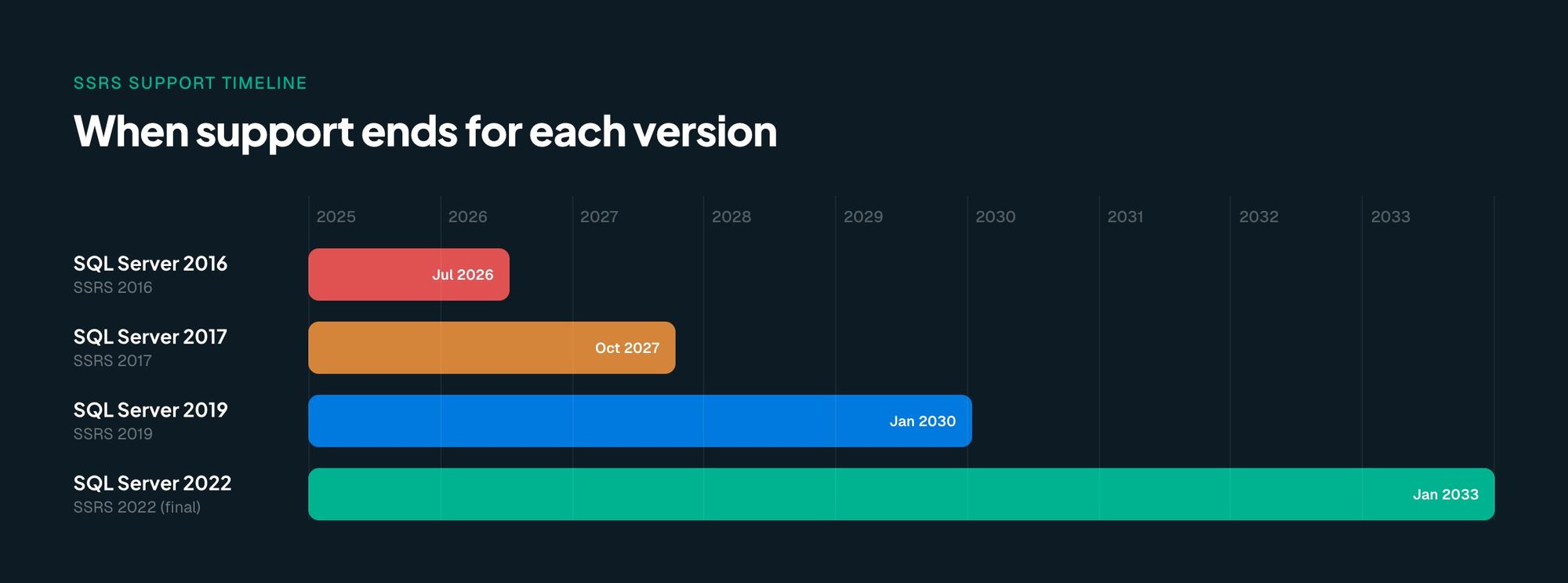
Your urgency depends on which SQL Server version you're running:
| SQL Server Version | SSRS Version | Extended Support Ends |
|---|---|---|
| SQL Server 2016 | SSRS 2016 | July 2026 |
| SQL Server 2017 | SSRS 2017 | October 2027 |
| SQL Server 2019 | SSRS 2019 | January 2030 |
| SQL Server 2022 | SSRS 2022 (final) | January 2033 |
If you're on SQL Server 2016, the clock is already ticking. If you're on 2022, you have time, but no reason to wait since the platform won't improve.
One critical detail: SSRS 2022 can continue to use later versions of the SQL Server Database Engine for its catalog database. Upgrading your database engine to SQL Server 2025 doesn't force an immediate SSRS migration, but it does mean you're running a reporting platform that Microsoft has stopped investing in.
Your Migration Options, and What Each One Actually Requires
There are more options than Microsoft's product roadmap suggests. Here's what each path actually involves, what it costs you, and who it's built for.
Before you evaluate any of these: any migration is time-consuming. Weeks at minimum, months for complex environments. The effort is comparable across options. What changes is the outcome. Choose a destination that matches how your team actually delivers reports, not just the one your vendor recommends.
Power BI Report Server (PBIRS): Microsoft's Official Replacement
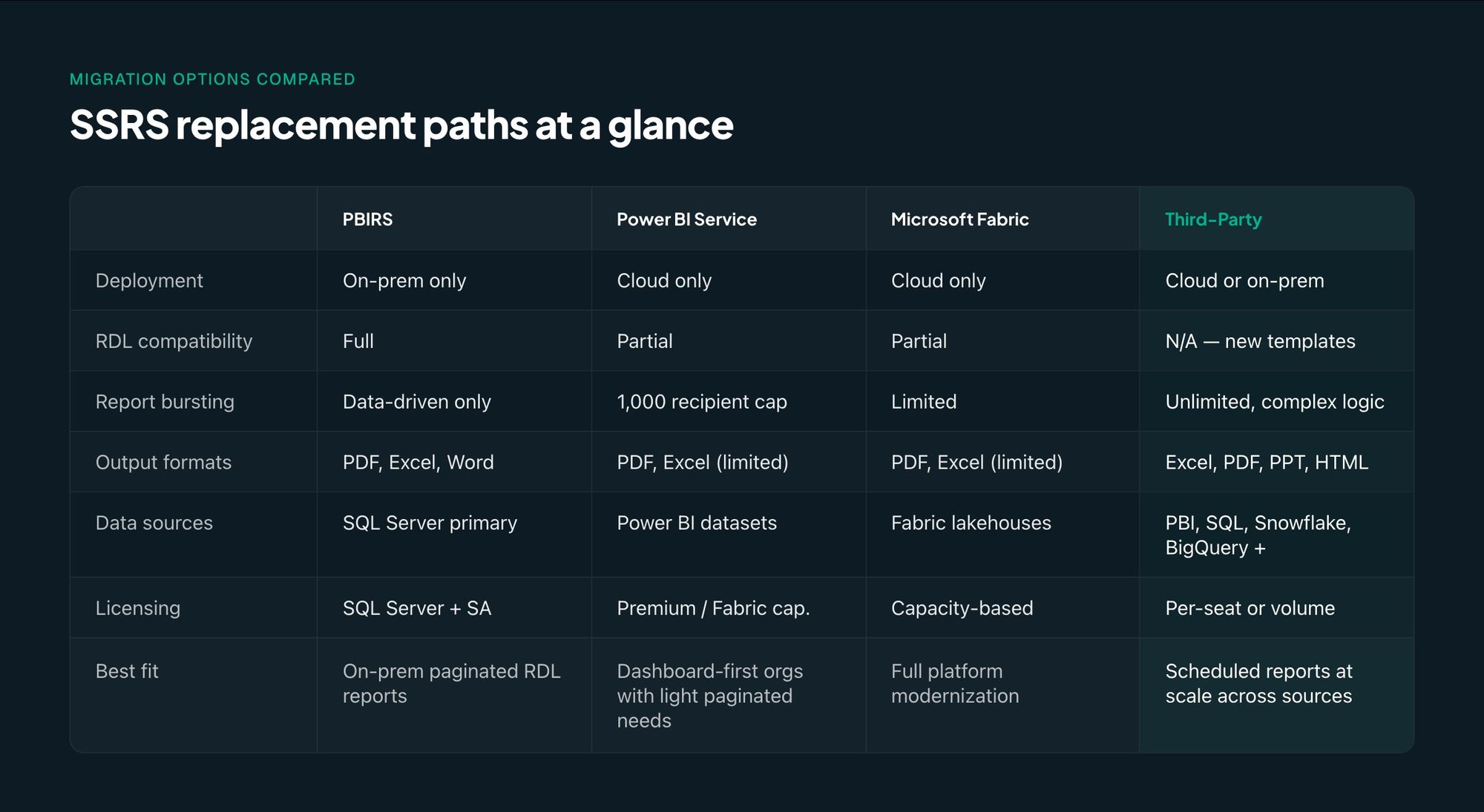
PBIRS is the closest thing to a drop-in SSRS replacement. It's a superset: everything SSRS does, PBIRS does, plus support for interactive Power BI reports (PBIX), data modeling, and custom visuals.
Your existing RDL reports are fully compatible. If your organization runs paginated reports and wants to stay on-premises, this is the most direct path.
The trade-offs are real, though. Licensing requires either a SQL Server 2025 purchase or, for older SQL Server versions, Enterprise Edition with active Software Assurance. There's no in-place upgrade; you're standing up a new PBIRS instance and migrating reports, subscriptions, and schedules. And while PBIRS adds Power BI capabilities, it doesn't add modern cloud data warehouse connectors, multi-source reporting, or Excel-native template authoring.
Best fit for: Organizations committed to on-premises reporting that primarily need paginated RDL reports and are ready to move to SQL Server 2025.
Power BI Service: Microsoft's Cloud Path
Power BI Service is where Microsoft wants you to land long-term. It supports paginated reports in the cloud, but paginated reporting is a secondary feature in a platform designed around interactive dashboards and self-service analytics.
Microsoft provides an RDL Migration Tool for converting reports, but the experience is different. Power BI's paginated reports lack some of the fine-grained formatting controls and expression language that SSRS offers. Excel output quality has documented issues: column widths drift, grouped data needs manual cleanup. Dynamic subscriptions are capped at 1,000 recipients with single-value filters only.
The licensing picture adds complexity. Paginated reports require Power BI Premium or Microsoft Fabric capacity, a significant cost increase over SSRS, which was included with your SQL Server license.
Best fit for: Organizations already deep in the Power BI ecosystem whose reporting needs lean toward interactive dashboards, with paginated reports as a secondary requirement.
Think twice if: Your team's core workflow is scheduled, formatted reports (Excel, PDF, or PowerPoint) distributed at scale. Power BI wasn't designed for that job.
Microsoft Fabric: Microsoft's Long-Term Bet
Fabric is Microsoft's comprehensive analytics platform: data engineering, data science, real-time analytics, BI, and reporting in one environment. It includes paginated report support and represents Microsoft's strategic vision for where analytics is headed.
It's also cloud-only, capacity-based in licensing, and a fundamentally different architecture from SSRS. Adopting Fabric means migrating your entire platform, not just your reports. Your team will need new skills, new workflows, and a new mental model for how reporting fits into the broader analytics stack. That's a significant commitment when the problem you're solving might be straightforward: "we need our scheduled reports to keep running."
Organizations already using Fabric for data engineering sometimes pair it with a dedicated reporting tool for last-mile distribution, keeping Fabric for the data platform and a separate tool for report generation and delivery.
Good for: Organizations aligned with Microsoft's analytics modernization vision who want a unified data platform and are comfortable with the investment that requires.
Third-Party Report Automation: Purpose-Built for Reporting Workflows
There's a category of tools built specifically for the workflow SSRS teams depend on: scheduled report generation, complex bursting, and distribution at scale. These aren't BI platforms that happen to have a reporting feature. They're purpose-built for report automation.
ConnectReport is one example. It covers both sides of the reporting workflow SSRS teams depend on. The Excel Add-in lets business users build and manage templates natively in Excel, the same tool your team already knows. For teams that need paginated PDF or PowerPoint output, ConnectReport's paginated reporting solution provides a web-based report editor with the same scheduling, bursting, and distribution infrastructure underneath. One template can generate thousands of individualized reports, each filtered to unique recipients, regions, or accounts through complex report bursting logic. Reports are scheduled, generated, and delivered automatically to email, OneDrive, or SharePoint.
What makes this category different from the Microsoft options: it's designed for the operational reporting workflow, not the analytics workflow. You're not learning a new design paradigm. You're still building reports in familiar tools, still scheduling delivery, still distributing to stakeholders, but with modern infrastructure underneath.
ConnectReport connects to SQL Server, Snowflake, BigQuery, Databricks, Power BI, Qlik Sense, and more, so whether you're working with one data source or several, you're not locked in. Deployment is flexible: cloud or on-premise. Security is enterprise-grade, with SOC 2 Type II and ISO 27001 compliance. 25% of the Fortune 500 receives reports through the platform, with over 1 million reports generated and delivered.
The speed difference is measurable. One customer saw 10x faster report generation compared to manual processes. Another reclaimed 70 hours per week of manual reporting work by automating their workflow.
Best fit for: Teams whose core need is scheduled, formatted reports (Excel, PDF, or PowerPoint) distributed at scale. Works with a single data source or many.
See how ConnectReport handles report automation at scale
The Question Most Migration Guides Skip
Most of the conversation around SSRS migration stays inside Microsoft's ecosystem: PBIRS, Power BI, Fabric. But there's a question worth asking before you commit: does the replacement actually match how your team works?
This matters because migration isn't free. It costs time, attention, and workflow disruption regardless of destination. What changes is the outcome.
Think about what your team actually does with SSRS day to day. If the answer is "we build paginated reports, schedule them, and deliver formatted documents to stakeholders," that's an operational reporting workflow. It has more in common with mail merge at scale than with data exploration or dashboard design. And the tool you migrate to should reflect that.
Power BI is designed for interactive analytics. Fabric is designed for comprehensive data platforms. PBIRS keeps you on-premises with the same constraints you've been working around for years. None of these were built from the ground up for the specific job of building, scheduling, and distributing formatted reports at scale, whether that's Excel workbooks, PDFs, or PowerPoint decks.
A finance team generating 500 reports every month, some as Excel workbooks with multi-sheet layouts, some as formatted PDFs for external stakeholders, each filtered by region and delivered to a different recipient on a set schedule, doesn't need a dashboard platform. They need a report automation engine that does exactly what they're already doing, faster and with less manual work.
"We just need scheduled reports emailed to people." That's how real users describe what they use SSRS for. If that sounds like your team, your migration destination should be a tool built for exactly that, not one that can do it as a secondary feature if you configure it right, with the right license tier, within the right set of limitations.
How to Assess Your Current SSRS Setup Before You Move
Before you pick a destination, take stock of what you're migrating. This assessment applies regardless of which path you choose, and skipping it is how teams discover gaps three months into a migration project.
Start with your report inventory. How many RDL reports are in production? Which ones are paginated reports with complex formatting? Which use data-driven subscriptions for bursting? Which are one-off exports that nobody would miss? The answers determine how much migration work you're actually looking at.
Next, document your data sources. Are you pulling exclusively from SQL Server, or do you also connect to other platforms? Most SSRS teams start with SQL Server, but your replacement tool shouldn't lock you in if your data needs grow. Tools like ConnectReport connect to Snowflake, BigQuery, Databricks, and more, so you're covered whether you have one data source today or five tomorrow.
Then map your delivery requirements. Who receives reports, how do they receive them, and at what scale? Email, file share, SharePoint, client portals? Ten recipients or ten thousand? The scale of your distribution determines which tools are viable.
Pay close attention to compliance-critical reports. Reports tied to financial close, regulatory compliance, or audit requirements need extra attention during migration. These can't break, and they can't change formatting unexpectedly.
Factor in your team's skills. Do you have RDL developers, Excel power users, Power BI analysts, or a mix? The right migration path minimizes retraining. If your team lives in Excel, a tool that uses Excel-native templates has a shorter ramp than one that requires learning a new report builder.
Finally, check your clock. Which SQL Server version are you on? If it's 2016, you have months, not years. If it's 2022, you have until 2033, but starting now means migrating on your schedule, not under pressure.
Migration Timeline: What to Expect
How long migration takes depends on where you're going and what you're bringing with you. Here's what organizations facing the SSRS end of life should realistically plan for.
PBIRS migration typically takes weeks to a few months for most organizations. RDL compatibility is a significant advantage since your reports don't need to be rewritten. The work is infrastructure: standing up the PBIRS instance, migrating the report catalog, recreating subscriptions and schedules, testing output, and retraining users on the new portal. If you have a straightforward SSRS deployment, this is the fastest Microsoft path.
Power BI or Fabric migration stretches to months or quarters. Many reports need to be redesigned rather than migrated because Power BI's paginated reports don't support every SSRS feature, and interactive reports require a fundamentally different design approach. Factor in new licensing procurement, new skills development, and a parallel running period where both systems operate simultaneously.
Third-party report automation (ConnectReport) typically takes days to weeks. The workflow translates directly. Whether you're building Excel templates or designing paginated reports for PDF output, you're still scheduling reports, still distributing to recipients. The connectors handle multi-source data, the scheduling engine replaces your SSRS subscriptions, and the bursting logic handles complex per-recipient delivery. Teams find the transition minimal because the workflow stays familiar.
Whatever path you choose, plan for a parallel running period. Keep SSRS operational until the new system is proven. You have the support window. Use it.
Frequently Asked Questions
Is SSRS being discontinued?
No new versions of SSRS will be released. SQL Server 2025 does not include SSRS; it includes Power BI Report Server instead. However, SSRS 2022 continues to receive security updates and support through January 11, 2033. It's in maintenance mode: stable, but frozen.
What replaces SSRS?
Microsoft's official replacement is Power BI Report Server (PBIRS) for on-premises reporting. For cloud reporting, Microsoft recommends Power BI Service or Microsoft Fabric. Third-party report automation platforms like ConnectReport offer an alternative path focused specifically on report generation, bursting, and distribution workflows.
Will my RDL reports work in Power BI Report Server?
Yes. PBIRS is a superset of SSRS and supports RDL reports natively. Your existing paginated reports carry over without needing to be rewritten.
Does SSRS work with SQL Server 2025?
SSRS 2022 can continue to use later versions of the SQL Server Database Engine to host its reporting catalog. You can upgrade your database engine without immediately replacing SSRS, but no new SSRS version ships with SQL Server 2025. PBIRS is included instead.
How long does SSRS migration take?
It depends on your destination and complexity. PBIRS migrations with compatible RDL reports typically take weeks. Power BI or Fabric migrations often stretch to months, especially when reports need redesign. Purpose-built report automation tools like ConnectReport can be operational in days to weeks, since the core workflow (build templates, schedule delivery, distribute reports) translates directly.
Choose a Migration Path That Fits How You Work
SSRS migration is coming for every organization that depends on it. The timeline varies (July 2026 if you're on SQL Server 2016, January 2033 if you're on SQL Server 2022) but the direction is clear. Microsoft has moved on.
You get to choose what comes next. Choose based on how your team actually works, not on what a vendor's product roadmap assumes you should want.
If your team runs on scheduled, formatted reports distributed to stakeholders, whether that's Excel workbooks, PDFs, or PowerPoint, choose a tool built for exactly that. ConnectReport handles complex bursting, scheduling, and distribution across output formats, with modern data connectors, enterprise-grade security, and the speed to make migration feel like an upgrade.
See how ConnectReport handles the reporting workflows your team depends on. Book a demo.